The future of invoicing is here.

Just describe it. AI handles the rest.

Your prompt

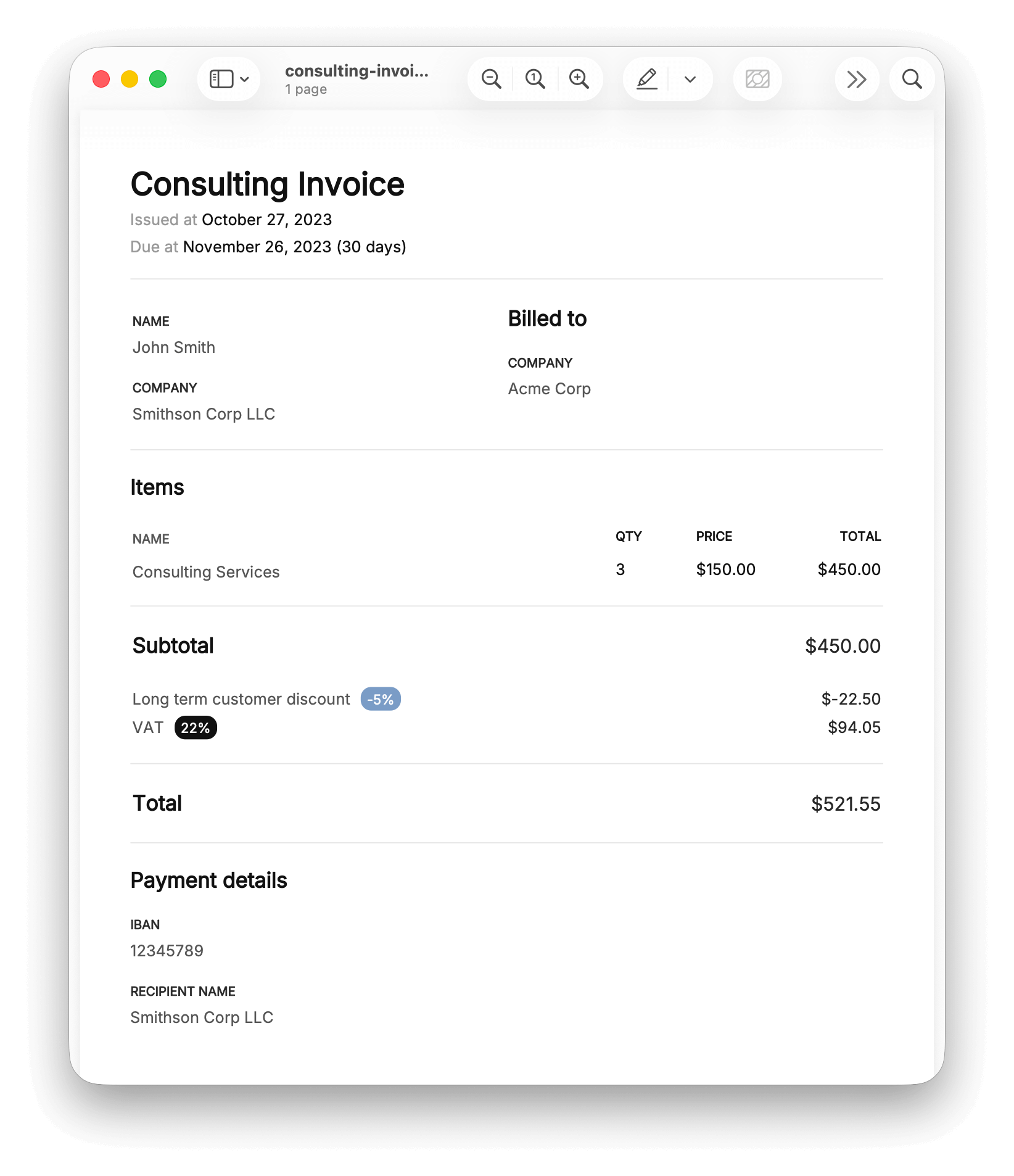
"Create an invoice for 3 hours of consulting at $150/hr for Acme Corp, 22% VAT, 5% long term customer discount, from John Smith, Smithson Corp LLC. Pay to IBAN 12345789, recipient name Smithson Corp LLC."

Sample generated invoice

Generate Your Invoice

Example Prompts

Click any example to use it as your prompt.

🇺🇸 US Consulting Invoice

Create an invoice titled 'Web Development Services - January 2025' from ACME Development LLC, 123 Tech Lane, San Francisco, CA 94102, to TechStart Inc., 456 Innovation Blvd, Austin, TX 78701, Attn: Sarah Johnson. Items: 40 hours of React development at $150/hour, 10 hours of code review at $125/hour, 5 hours of deployment support at $175/hour. Apply 10% volume discount. Add 8.25% Texas sales tax. Due in 30 days. Payment via wire transfer to Wells Fargo, Account: 7890123456, Routing: 121000248, Account name: ACME Development LLC. Use USD currency and US date format.

🇪🇺 German Freelancer Invoice

Erstelle eine Rechnung mit dem Titel 'Grafikdesign Dezember 2025' von Max Mustermann, Designstudio Berlin, Friedrichstraße 123, 10117 Berlin, USt-IdNr: DE123456789, an Müller GmbH, Hauptstraße 45, 80331 München, z.H. Frau Schmidt. Positionen: 25 Stunden Logo-Entwicklung zu 85€/Stunde, 15 Stunden Visitenkarten-Design zu 65€/Stunde, 8 Stunden Briefpapier-Design zu 65€/Stunde. Rabatt: 5% Treuerabatt. Mehrwertsteuer: 19% MwSt. Zahlbar innerhalb von 14 Tagen. Bankverbindung: Deutsche Bank, IBAN: DE89 3704 0044 0532 0130 00, BIC: COBADEFFXXX. Währung EUR, deutsches Datumsformat.

🇬🇧 UK Agency Invoice

Generate an invoice titled 'Marketing Campaign Q4 2025' from Digital Spark Agency, 10 Kings Cross Road, London, WC1X 9QA, VAT: GB123456789, to Brighton Boutique Ltd, 25 North Street, Brighton, BN1 1EB, FAO: James Williams. Line items: 1 Social media strategy at £2,500, 1 Content creation package at £1,800, 20 hours of campaign management at £95/hour, 1 Analytics report at £450. Apply 15% early payment discount. Add 20% VAT. Payment terms: Net 21 days. Pay by BACS to Barclays Bank, Sort: 20-00-00, Account: 12345678, Ref: INV-2025-Q4. British pounds, UK format.

🇯🇵 Japanese Translation Invoice

Create an invoice titled '翻訳サービス 2025年1月' from Tanaka Translation Services, 東京都渋谷区神宮前1-2-3, to Sony Corporation, 東京都港区港南1-7-1, Attention: 山田太郎様. Items: 50,000 characters of technical translation at ¥15/character, 10,000 characters of proofreading at ¥8/character, 1 rush delivery fee at ¥25,000. No discounts. Add 10% consumption tax (消費税). Due within 30 days. Payment to Mizuho Bank, Branch: 渋谷支店, Account: 普通 1234567, Name: タナカ翻訳サービス. Japanese Yen, Japan locale.

🇦🇺 Australian Contractor Invoice

Invoice titled 'Building Inspection Services - December 2025' from Coastal Building Inspections Pty Ltd, ABN: 12 345 678 901, 42 Beach Road, Gold Coast QLD 4217, to Sunshine Property Group, 100 Eagle Street, Brisbane QLD 4000, Attn: Michael Thompson. Services: 3 pre-purchase inspections at $550 each, 2 pest inspections at $350 each, 1 pool safety inspection at $275, travel allowance $120. Discount: $100 multi-service discount. GST: 10% GST. Payment due in 14 days. Direct deposit to Commonwealth Bank, BSB: 064-000, Account: 12345678, Name: Coastal Building Inspections. Australian dollars, Australian format.

🇸🇪 Swedish SaaS Invoice

Skapa en faktura med titeln 'SaaS Prenumeration Januari 2025' från CloudTech AB, Org.nr: 556123-4567, Storgatan 10, 111 23 Stockholm, till Nordisk Innovation AB, Kungsgatan 55, 411 15 Göteborg, att: Erik Lindberg. Poster: 1 Enterprise-licens för 50 användare till 15 000 SEK/månad, 1 Premium support-paket till 3 000 SEK, 10 timmar anpassad utveckling till 1 200 SEK/timme. Ingen rabatt. Moms: 25% moms. Betalningsvillkor: 30 dagar netto. Bankgiro: 123-4567, Swish: 1234567890, Referens: CT-2025-001. Svenska kronor, svenskt datumformat.

Create an Account for Even More

Unlock powerful features to streamline your invoicing workflow and integrate with your existing tools.

Save Time

Saved Contexts for Faster Invoicing

Stop typing the same information over and over. Save your business details, payment info, and client data as reusable contexts.

  • Store your company name, address, and tax ID
  • Save bank details and payment instructions
  • Organize contexts with labels for quick access
  • Use saved contexts with a single click
Saved Contexts for Faster Invoicing
Stay Organized

Invoice Management Dashboard

Keep track of all your invoices in one place. See what's been paid, what's outstanding, and never miss a payment again.

  • View total invoiced, paid, and outstanding amounts
  • Track payment status and due dates
  • Download invoices as PDFs anytime
  • Filter by currency and search your history
Invoice Management Dashboard
Automate

Full REST API for Automation

Integrate invoice generation into your existing workflows. Build custom integrations, automate recurring invoices, and more.

Full REST API for Automation

Ready to take your invoicing to the next level?

Start Free Trial

Frequently Asked Questions

What currencies are supported?

Invobi supports the following currencies:

  • USD — US Dollar ($)
  • EUR — Euro (€)
  • GBP — British Pound (£)
  • JPY — Japanese Yen (¥)
  • CAD — Canadian Dollar
  • AUD — Australian Dollar
  • CHF — Swiss Franc
  • SEK — Swedish Krona
  • NOK — Norwegian Krone
  • DKK — Danish Krone
  • PLN — Polish Złoty

To specify a currency, simply mention it in your prompt:

  • "...total of 500 EUR..."
  • "...charge £150 per hour..."
  • "...invoice in Japanese Yen..."
What locales/formats are supported?

Invobi supports the following locales for date and number formatting:

  • US — United States December 26, 2025
  • UK — United Kingdom 26 December 2025
  • DE — Germany 26. Dezember 2025
  • FR — France 26 décembre 2025
  • ES — Spain 26 de diciembre de 2025
  • IT — Italy 26 dicembre 2025
  • NL — Netherlands 26 december 2025
  • EE — Estonia 26. detsember 2025
  • SE — Sweden 2025-12-26
  • NO — Norway 26. desember 2025
  • FI — Finland 26. joulukuuta 2025
  • DK — Denmark 26. december 2025
  • PL — Poland 26 grudnia 2025
  • JP — Japan 2025年12月26日
  • AU — Australia 26 December 2025
  • CA — Canada December 26, 2025

To specify a locale, mention the country in your prompt:

  • "...use Estonian date format..."
  • "...format for UK..."
  • "...invoice for a German client..."
Is this service free?

Invobi offers both free and paid options:

  • Free tier — No account required. Generate up to 5 invoices per day using your own API key. You pay only for the AI API calls directly to your chosen provider (like Google Gemini or OpenAI).
  • Paid accounts — Create an account to unlock 500 invoices per day, save invoices to your dashboard, manage and track your invoices, and access the REST API for automation.

The core AI-powered invoice generation is always free — you just bring your own API key.

Are there any usage limits?

Yes, there are rate limits to ensure fair usage for everyone:

  • Guests (no account) — 5 invoices per 24-hour rolling window.
  • Registered users — 500 invoices per 24-hour rolling window, plus the ability to save and manage invoices.

The limits are based on a rolling window, so they reset gradually as time passes rather than all at once.

Is my data secure?

Your privacy and security are our top priority:

  • API keys are never stored — your key is only used for the single request to generate your invoice and is immediately discarded.
  • Free users: no data retention — your invoice is generated on-the-fly and sent directly to you. We don't keep copies.
  • Paid accounts: you're in control — we store your invoices for your convenience, but you can delete any or all of your data at any time from your account settings.

We believe in privacy by design — we collect only what's needed to provide the service, and you always have full control over your data.

How is my API key remembered?

When you check "Remember API key", your API key is stored in your browser's localStorage — a secure, local storage area that only this website can access.

Important points:

  • We never store your API key — it stays entirely in your browser, on your device.
  • We never send it to our servers — except when making the API call to generate your invoice, where it's used once and immediately discarded.
  • You're in control — uncheck the box anytime to remove it from your browser.

This is the same technology used by countless websites to remember your preferences. Your API key never leaves your device unless you explicitly generate an invoice.

How do I get an API key?

We support multiple LLM providers. Choose the one that works best for you:

Google Gemini

Recommended for beginners — generous free tier and excellent results.

  1. Visit Google AI Studio
  2. Sign in with your Google account
  3. Click "Create API Key"
  4. Copy the key and select a Gemini model above

Available models: Gemini 2.5 Flash, Gemini 2.5 Flash Lite, Gemini 2.5 Pro, Gemini 2.0 Flash, Gemini 2.0 Flash Lite.

OpenAI

  1. Visit OpenAI Platform
  2. Sign in or create an account
  3. Create a new API key
  4. Copy the key and select an OpenAI model above

Available models: GPT-4o, GPT-4o mini, GPT-4 Turbo, GPT-4.1, GPT-4.1 mini.